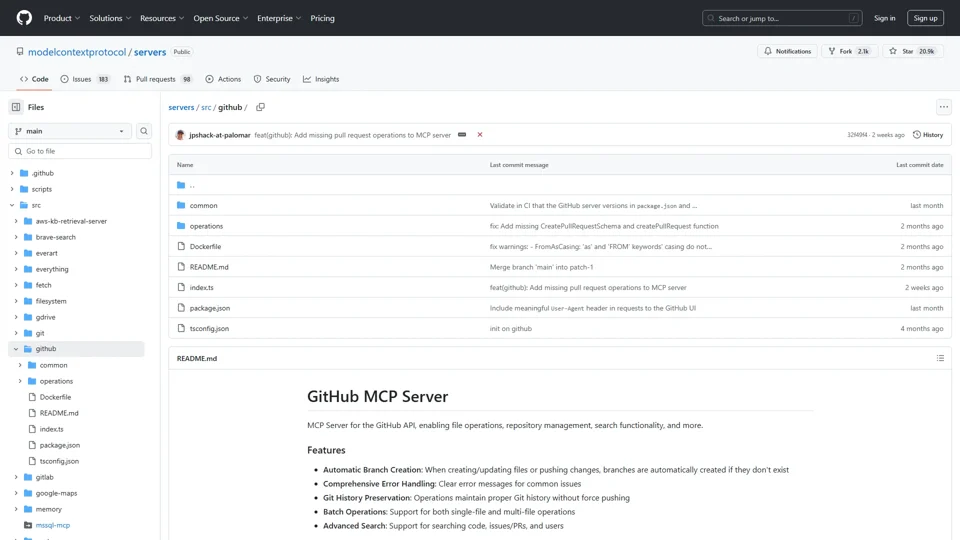
What is the GitHub MCP Server?
The GitHub MCP Server is an API-driven tool designed to automate and streamline GitHub operations, providing developers and AI teams with programmatic access to repository management, file operations, advanced search, and collaboration workflows. It serves as a bridge between AI applications and GitHub’s infrastructure, enabling seamless integration for automating code deployments, managing AI model repositories, and handling large-scale development tasks.
Key Features
-
Automated Branch Management: Automatically creates branches during file updates, ideal for testing AI models without disrupting main codebases.
-
Batch File Operations: Push multiple files in a single commit, reducing overhead when updating AI configurations or datasets.
-
Git History Integrity: Preserves commit history during operations, critical for auditing AI model iterations.
-
Advanced Search API: Search code, issues, and users using GitHub’s syntax, enabling AI-powered code analysis.
-
CI/CD Integration: Tools for pull request reviews, merges, and status checks to maintain robust AI pipelines.
How It Enhances AI Development
-
Setup with Personal Access Token
- Create a token with
reposcope for full repository control orpublic_repofor public projects. - Integrates with AI tools like Claude Desktop via Docker or NPX for automated workflows:
{
  "mcpServers": {
    "github": {
      "env": {
        "GITHUB_PERSONAL_ACCESS_TOKEN": "your_token_here"
      }
    }
  }
}
- Create a token with
-
AI Use Cases
- Automate dataset versioning using
push_filesto update training data repositories. - Monitor model issues via
search_issueswith queries likelabel:bug is:open. - Streamline collaboration using
create_pull_request_reviewfor AI code reviews.
- Automate dataset versioning using
Pricing
The GitHub MCP Server is ### open-source (MIT License), offering free access to all features. Users only need a GitHub account and personal access token.
Helpful Tips for AI Teams
- Use
search_codewithlanguage:python path:modelsto analyze AI model repositories. - Leverage
create_branchto isolate experimental AI features before merging. - Combine
list_commitsandget_file_contentsto track model training progress.
Frequently Asked Questions
Q: How does this differ from GitHub CLI?
A: The MCP Server provides API endpoints for programmatic control, making it ideal for integrating GitHub operations into AI pipelines.
Q: Can I use this for private AI repositories?
A: Yes—configure your token with repo scope to access private repositories securely.
Q: Is concurrent operation handling supported?
A: Yes, the server manages concurrent requests, essential for high-volume AI workflows.
Q: How does it handle rate limits?
A: Built-in error messages notify users of GitHub API rate limits, allowing graceful retries in AI scripts.
Q: Can I use this in CI/CD pipelines?
A: Absolutely—tools like merge_pull_request and get_pull_request_status automate deployment checks for AI services.
By abstracting GitHub’s complexity, the MCP Server empowers AI teams to focus on innovation while maintaining version control, collaboration, and operational efficiency. Its API-first design makes it particularly valuable for automating model training, dataset management, and AI artifact tracking at scale.